
Your Snowflake bill increased 40% last quarter, but query performance actually got worse.
Sound familiar?
All FinOps organizations eventually run into this wall when they outgrow Snowflake’s basic auto-suspend and resource monitors. While Snowflake’s per-second billing offers flexibility, it also means a single efficient query can eat through hundreds of dollars – which is why manual warehouse management can’t keep pace with enterprise-sized workloads.
The bright side: modern Snowflake FinOps fixes this with automated systems that allow you to optimize spend and performance in real time.
How do you get to that point? Read on. We’ll share all of our FinOps best practices,e automation strategies, and real-world tactics that have helped enterprises cut monthly Snowflake costs by 30% or more.
What is FinOps for Snowflake?
FinOps is the marriage of engineering, finance, and data teams in the cloud. When it comes to Snowflake, that means balancing performance, cost, and quality across your data platform – all while maintaining business agility
Unlike your traditional cloud FinOps that focus on infrastructure, Snowflake FinOps requires managing:
- Credit-based consumption: At $2-4 per credit (depending on your region and edition) with cost scaling linearly from X-Small (1 credit/hour) to 6X-Large (512 credits/hour).
- Query-level optimization: Using QUERY_HISTORY and WAREHOUSE_METERING_HISTORY views to identify expensive queries before they ruin your budget.
- Dynamic warehouse scaling: Beyond basic auto-suspend, implementing intelligent scaling based on queue depth and query complexity
- Storage and data transfer: Long-term storage and cross-regional replication can add significant costs if not managed with lifestyle policies and governance.
The big challenge here? Manual management. That same hands-on approach that worked so well for traditional infrastructure of the past breaks down when you apply the same method to millions of queries and dozens of ever-changing warehouses.
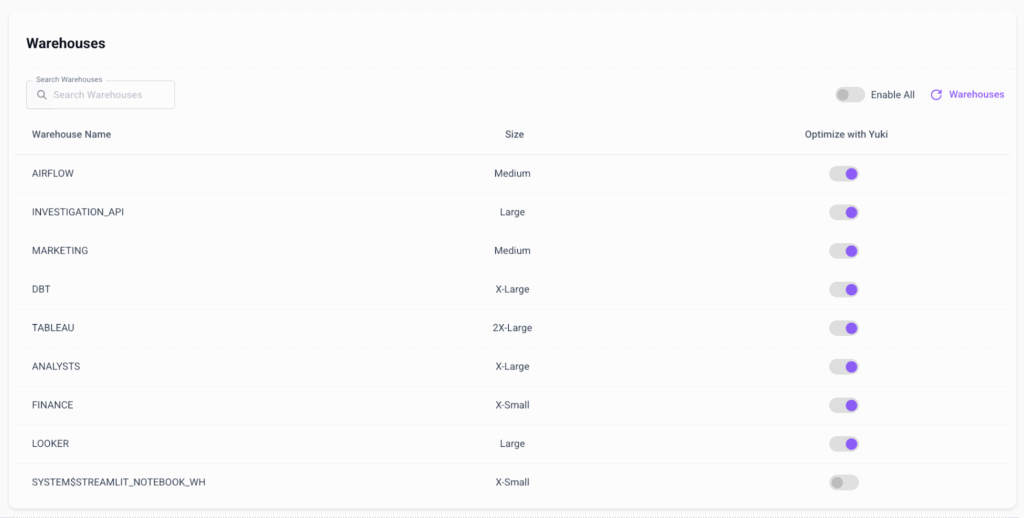
Why Manually Managing Snowflake For FinOps Is So Expensive
Before we get into the “how to fix it” section of the article, let’s address the real cost of manual Snowflake management. These are the expenses that don’t show up on your bill, but completely ruin your ROI.
The Engineering Time Tax
Your data engineers aren’t working for you to babysit warehouses. Yet many teams still find themselves spending hours each week manually resizing, suspending, and monitoring clusters. Even if that’s just 5-10 hours per engineer, that’s thousands of dollars lost in productivity per month – before you even add in wasted compute.
Manual management also results in issues like:
- Overprovisioned warehouses kept large just in case
- Idle compute burning credits overnight
- Compliance gaps from inconsistent chargeback and lack of audit trails
The Speed vs. Cost Dilemma
Fast-growing companies always run into this growing pain: should they optimize for speed or for cost? Most choose speed, leaving them with:
- Overprovisioned warehouses to avoid performance bottlenecks
- Warehouse sprawl as teams created dedicated resources for SLAs
- Idle compute running 24/7 “just in case”
The result? Snowflake costs outgrowing revenue and eating into margin and ROI.
The Compliance Complexity
Enterprise FinOps needs control, not just cost reduction. You’ll find manual approaches falling short of this:
- Granular spend attribution across cost centers and teams
- Real-time budget enforcement to prevent runaway costs
- Audit trails for compliance and chargeback scenarios
- Role-based access maintaining security while enabling autonomy
These challenges only continue to compound as you scale, making manual management not just expensive, but impossible to maintain.
6 Ways to Improve Efficiency for Your Snowflake FinOps Setup
The key to an efficient (and not super expensive) Snowflake FinOps setup is to be systematic with your approach. Address immediate optimization opportunities, then move on to more long-term scalability.
#1: Implement Granular Cost Attribution
The problem: Snowflake’s native cost reporting only shows warehouse-level spending. You need query- and team-level attribution for effective chargeback.
The solution: Build automated tagging and attribution using Snowflake’s metadata like this:
-- Set up cost attribution table
CREATE TABLE cost_attribution AS
SELECT
  qh.query_id,
  qh.user_name,
  qh.warehouse_name,
  qh.database_name,
  qh.schema_name,
  qh.credits_used_cloud_services,
  -- Extract team from username pattern or use session context
  CASE
    WHEN qh.user_name ILIKE '%analytics%' THEN 'Analytics Team'
    WHEN qh.user_name ILIKE '%eng%' THEN 'Engineering Team'
    ELSE 'General'
  END as team_attribution,
  qh.start_time
FROM snowflake.account_usage.query_history qh
WHERE qh.start_time >= dateadd(day, -30, current_timestamp());
You can use this to pull key metrics like:
- Cost per team per month: SUM(credits_used * $3) GROUP BY team_attribution
- Most expensive users: SUM(credits_used) GROUP BY user_name
- Warehouse efficiency: credits_used / execution_time ratio
#2: Automated Chargeback and Showback Models
The problem: No clear cost attribution means that teams often treat Snowflake as if it were “free,” leading to wasteful usage and budget overruns.
The solution: Automated cost attribution that gets you accountability without expensive administration overhead:
- Tag-based attribution that automatically assigns costs to projects and business units
- Usage-based chargeback for shared warehouses using per-query
- Predictive showback forecasting team spend based on current trends
- ROI tracking connecting data platform costs to business outcomes
Manual tagging doesn’t scale. You need systems that automatically attribute costs based on your usage patterns, user roles, and business context.
#3: Proactive Budget Management and Alerts
The problem: Reactive alerts document overspend after it happens. They don’t prevent it.
The solution: Intelligent budget management that actually prevents overruns before they occur:
- Predictive alerting based on usage trends and historical patterns
- Automated spend controls scaling resources down when budgets risk
- Multi-tiered notifications that escalates teams to finance as spending approaches limits
- Business-context budgeting adjusting limits based on revenue cycles
Effective budget management isn’t about saying “no”. It’s saying “yes” to the right workloads while automating the rest.
#4: Automated Warehouse Scaling
The problem: Snowflake’s auto-suspend helps with idle time, but it doesn’t actually optimize warehouse size when it comes to workload complexity.
The solution: Implement workload-aware scaling. For example, use Snowflake’s WAREHOUSE_LOAD_HISTORY to track query depth and concurrency, then programmatically adjust sizes via Snowflake Python Connector or Snowpark API:
import snowflake.connector

conn = snowflake.connector.connect(
    user='USER',
    password='PASSWORD',
    account='ACCOUNT'
)

cur = conn.cursor()
cur.execute("""
SELECT AVG(avg_queued_load)
FROM snowflake.account_usage.warehouse_load_history
WHERE warehouse_name='COMPUTE_WH'
AND start_time >= dateadd(minute, -5, current_timestamp());
""")

queue_depth = cur.fetchone()[0]

if queue_depth > 50:
    cur.execute("ALTER WAREHOUSE COMPUTE_WH SET WAREHOUSE_SIZE = 'LARGE'")
elif queue_depth < 10:
    cur.execute("ALTER WAREHOUSE COMPUTE_WH SET WAREHOUSE_SIZE = 'SMALL'
This approach can help you reduce warehouse costs by 20-40% because it lets you match your compute size to actual workload requirements.
#5: Strategic Workload Investment
The problem: All workloads aren’t equal. Fraud detection needs different allocation outside of monthly reports.
The solution: ROI-device resource allocation aligning your spending with real business values:
- Workload classification that automatically identifies business-critical vs development queries
- Priority-based allocation so you can be certain critical workloads always get resources first
- Cost-per-insight analysis which lets you measure business value per dollar spent
- Automated lifecycle management that lets you retire low-value processes while scaling high-impact ones
This step lets you move past generic optimization into business-aware optimizations you can create the perfect system for varying workloads.
#6: Automated Governance and Compliance
The problem: Manual governance doesn’t scale. Maintaining control without slowing growth becomes more and more impossible as teams grow.
The solution: Intelligent guardrails that maintain control and enable autonomy:
- Role-based resource limits that prevent unauthorized warehouse creation or sizing
- Automated compliance monitoring to keep data governance policies in place
- Policy-driven scaling that allows you to apply optimization rules based on workload classification
- Audit-ready reporting so you can get complete visibility for compliance and chargeback
These six approaches build out a foundation for your FinOps platform to operate automatically, letting your teams focus on innovation while maintaining growth.

Snowflake FinOps Quick Wins: How to Get Started
If you’re scratching your head wondering how you’re going to implement any one of those six steps above, don’t be discouraged. Automation can seem overwhelming. Before you dive in, make sure you’ve already implemented these three easy quick fixes:
Fix #1: Enabling Basic Controls
Before you get into automation, this puts guardrails in place. Resource monitors mean you can cap resources before budgets spiral.
Here’s an example of what this could look like to prevent runaway spending by suspending warehouses when you reach a certain quota:
-- Create a resource monitor for your main warehouse
CREATE RESOURCE MONITOR main_warehouse_monitor
WITH CREDIT_QUOTA = 1000
  TRIGGERS
    ON 75 PERCENT DO NOTIFY
    ON 100 PERCENT DO SUSPEND_IMMEDIATE;

-- Apply to your warehouse
ALTER WAREHOUSE COMPUTE_WH SET RESOURCE_MONITOR = main_warehouse_monitor;
Fix #2: Identifying Cost Drivers
Before you dig into automation, you need visibility. This query helps you quickly find your top cost drivers (i.e., those users and queries that are burning through the bulk of your credits) so you can decide if you need to optimize, reclassify, or reallocate workloads.
-- Find your most expensive queries from the last 30 days
SELECT
  query_text,
  warehouse_name,
  total_elapsed_time/1000 as seconds,
  credits_used_cloud_services,
  (credits_used_cloud_services * 3) as estimated_cost_usd
FROM snowflake.account_usage.query_history
WHERE start_time >= dateadd(day, -30, current_timestamp())
ORDER BY credits_used_cloud_services DESC
LIMIT 10;
Fix #3: Optimizing Warehouse Sizing
This lets you align your warehouse size with actual usage so you can avoid the trap of running a Large warehouse for a workload that only needs a Small.
SELECT
  warehouse_name,
  avg(avg_running) as avg_concurrent_queries,
  avg(avg_queued_load) as avg_queue_depth
FROM snowflake.account_usage.warehouse_load_history
WHERE start_time >= dateadd(day, -7, current_timestamp())
GROUP BY warehouse_name;
If your avg_queue_depth > 100: Scale up your warehouse
If avg_concurrent_queries < 1: Consider smaller warehouses or using a longer auto-suspend
Snowflake FinOps Challenges to Watch Out For
But before you get ahead of yourself, make sure to keep an eye out for these unique FinOps challenges.
Maintaining Fraud Detection & Risk Scoring at Scale
Financial service teams need millisecond response times for fraud detection. Downtime is simply not an option. Status provisioning either wastes compute or fails under spikes.
The solution: Invest in a third-party tool that detects anomalies in query volume and dynamically scales compute to meet SLAs, then scales back when that load reduces.
Multi-Region Compliance & Data Residency
Global enterprises have to maintain data residency requirements while continuing to optimize costs across different regions. Doing this manually means having to carefully balance regulatory compliance and cost optimization across multiple geographic regions and regulatory frameworks.
The solution: Use automated, region-aware optimization. This lets you maintain compliance while minimizing cross-region data movement costs. Think intelligent query routing that processes all you need within boundaries, optimizing for cost and performance and getting you the best of both worlds.
AI & Machine Learning Pipeline Economics
ML workloads have completely different requirements than your standard BI queries. You’re often left with static provisioning that either wastes money during model training downtimes or fails during intensive periods.
The solution: Workload-aware optimization that automatically provisioning specialized resources for training, switching to standard compute for interference, managing your entire pipeline lifecycle without manual intervention.
Seasonal Business Variations
Retail companies see massive increases in queries during the holidays. Financial services spike at month-end and quarter-end. Traditional static provisioning wastes money during quiet periods, or fails during peaks.
The solution: Predictive scaling based on business calendar patterns and historical data. Systems can then automatically pre-scale before high-demand periods and then gradually decrease as demand subsides.
[how do these solutions actually work though?? What’s the code or actual solution? These are ideas, not actual tips]
The Future of Snowflake FinOps
FinOps strategies have to continue to evolve alongside Snowflake. That means always being on your toes and ready to adapt to the next new thing.
AI-Native Cost Optimization
It shouldn’t surprise you to see AI on this list. Next-generation systems will be using machine learning for everything. Not just analysis, but optimization, too:
- Predictive configurations for new workloads based on historical patterns
- Automated query tuning using reinforcement learning
- Intelligent data placement that minimizes storage and compute costs at the same time
AI-native approaches take you another step further from reactive optimization to predictive cost management. It means you can prevent inefficiencies before they even occur.
Multi-Cloud FinOps
As cloud adoption only continues to grow, FinOps must be prepared to manage:
- Cross-cloud cost optimization considering data gravity and egress charges
- Vendor-agnostic optimization that maintains efficiency regardless of the cloud provider
- Unified governance across different platforms and pricing models
Multi-cloud FinOps requires you to look beyond Snowflake and see the bigger total data platform economics picture across all cloud providers.
Automation On a Whole New Level
Manual FinOps worked when you had five warehouses and 100 daily queries. At an enterprise scale, it collapses under the weight of hundreds of queries, teams, and compliance requirements.
The organizations succeeding with Snowflake FinOps aren’t tracking costs in spreadsheets – they’re automating everything.
That’s where Yuki comes in. Our platform continuously analyzes your Snowflake usage, optimizes workloads in real time, and delivers up to 30% cost reduction in the first month. And it does all that without sacrificing performance?
Ready to see what automated FinOps looks like? Book your personal demo with Yuki today.