Remember when managing a Snowflake compute was easy? You had ten t-shirt sizes, from X-Small to 6X-Large. If a query was slow, you picked a bigger size. If the bill was high, you picked a smaller one. It was a simple, predictable system that let us focus on building data products, not babysitting infrastructure. But those days are long gone. This post is my story, a journey from that initial simplicity into the complex, often frustrating world of modern Snowflake warehouse management, and how I ultimately built a way out.
The game changed when Snowflake introduced Gen 2 warehouses. Suddenly, our simple list of ten options doubled to twenty. The question was no longer just “What size do I need?” but “What type of warehouse is best?” A Large Gen 1 warehouse behaves differently and costs less than a Large Gen 2. Choosing the right one for a mixed workload, a blend of tiny, metadata-heavy queries and massive, CPU-intensive transformations – became a nightmare. Optimize for one, and you either burn money or sacrifice performance on the other.

Read more about it.
Then came Snowflake Adaptive Warehouse, promising a serverless utopia where we could “stop picking sizes.” In reality, it just traded one set of problems for another. We now had to guess a maximum size and set a rigid hourly credit budget, turning warehouse management into a high-stakes game of setting two knobs just right. Guess wrong, and you either face failed jobs or massive cost overruns.
This article is a deep dive into that vicious cycle: the constant firefighting between performance and cost, the home-grown automation scripts that inevitably fail, and the realization that the “one warehouse per system” model is fundamentally broken. I’ll walk you through the painful, real-world scenarios that prove why every query deserves its own special treatment. More importantly, I’ll show you how we built a lightweight, intelligent proxy to make that happen automatically, restoring the original promise of Snowflake by taking the guesswork, the spreadsheets, and the 3 a.m. alerts out of the equation for good.
The Good Old Days: When 10 T-Shirts Were All You Needed
I remember my first real experience with Snowflake back in 2018. It felt like moving out of a cramped, noisy shared apartment and into a luxury, full-service hotel. For years, my teams had fought with on-premise data warehouses, that required months of planning to scale and an army of specialists to maintain. Suddenly, here was a platform where compute was just a credit card away and storage was basically free. The relief…
The best part? The beautiful, almost boring simplicity of it all. The core unit of compute, the virtual warehouse, came in 10 straightforward t-shirt sizes. You started with an X-Small and could scale all the way up to a 6X-Large. The math was clean, predictable. Each step up the ladder doubled your compute power and doubled your credit consumption per hour. It was a promise of simplicity, a pact that let us focus on our actual jobs.
If a data loading job was running slow, you nudged the warehouse size up. If the CFO sent a concerned email about the monthly bill, you nudged it back down. That was it. There was no hidden complexity, no arcane knowledge required. To make it even simpler, I printed out a cheat-sheet and taped it to my monitor. It quickly became the unofficial bible for my entire data team.
| Size | Credits / Hr | Go-To Jobs | Personal Note |
| X-Small | 1 | Timestamp look-ups, CI migrations, demos | “Use and forget” |
| Small | 2 | Small BI charts, docs metadata, dbt dry runs | Our best seller early on |
| Medium | 4 | Daily ELT, dbt production, Airflow DAGs | Sweet cost/perf spot |
| Large | 8 | Exec dashboards, JSON shredding, 10+ concurrency | Quick fix for latency tickets |
| X-Large | 16 | Data science feature builds, week-end backfills | CFO raises an eyebrow |
| 2X-Large | 32 | 2-TB COPY INTO, ML training extracts | “Ask first!” sticker on the run-book |
| 3X-Large | 64 | Data migrations, board packet aggregates | Only for quarter-close |
| 4X-Large | 128 | Total warehouse reload, GDPR deletes | Schedule a stand-up after |
| 5X-Large | 256 | Rare audits, entire lake re-partition | Have pizza ready |
| 6X-Large | 512 | “Hold-my-beer” mode | I’ve used it twice in seven years |
This cheat-sheet was more than just a reference, it was a symbol of an era. We spent our days building data products and our nights sleeping soundly, not negotiating with the compute meter. The predictability of the platform fostered a highly productive engineering culture. We could hire for and cultivate rapid feature development because the cost of compute was a stable, understandable line item. Finance was happy, engineering was happy, and we were shipping value. This was the golden era, and the core of Snowflake’s initial value proposition wasn’t just the technology, it was the separation of concerns. We did our job, the warehouse did its job.
Then, things started to change.
The Tipping Point: How More Options Became a Minefield
In 2025, Snowflake announced Gen 2 warehouses. On paper, it was fantastic news: new silicon, smarter cache management, and roughly double the throughput for many workloads. I was genuinely thrilled. Who doesn’t want their queries to run faster?
“Amir, our month-end report is 10% slower on Large-Gen1. Should I try a Medium-Gen2 and risk it, or go to X-Large-Gen1 and blow the budget?”
“Marketing needs their new dashboard to have sub-second latency. Is that a Large-Gen2 or an X-Large-Gen1? What’s the cost difference?”
Suddenly, my simple, ten-row cheat-sheet ballooned into a twenty-row matrix of pain. Every decision spawned another spreadsheet, another benchmark, another “it depends.” The clean separation of concerns we once enjoyed was gone, replaced by a constant, low-grade hum of infrastructure anxiety.
The Weird Cost Math Deep Dive
The source of this anxiety was that Gen 2 performance wasn’t free. The on-demand price for a Gen 2 warehouse runs about 30% higher than its Gen 1 counterpart of the same t-shirt size. If your query was genuinely CPU-bound and could leverage the new hardware, you came out ahead. But what about mixed workloads?
Imagine a common scenario: a warehouse serving a BI tool. Maybe 80% of its queries are small, metadata-heavy lookups to populate filter dropdowns, and 20% are large, complex aggregations to render the actual charts. On a Gen 1 warehouse, this was manageable. But to speed up that 20% of heavy queries, you might be tempted to switch to a pricier Gen 2 warehouse. The moment you do, you’ve just increased the cost of the other 80% of your queries for zero performance gain. Choosing the “one right warehouse” for this kind of workload became a nightmare, a constant balancing act between angry users complaining about latency and angry accountants complaining about the bill.
Deconstructing Adaptive Warehouses: The Two-Knob Trap
Snowflake, to their credit, saw the problem they had created and offered a solution: Snowflake Adaptive Warehouse. The marketing headline was a siren song to any beleaguered data leader: “Stop picking sizes, let Snowflake do it”. It sounded utopian. In reality, it just traded one form of complexity for another.
To enable it, you just had to tick a box and configure two simple-looking knobs: a Max warehouse size and a Credit budget. This, I soon discovered, was the “Two-Knob Trap.” Guess the max size too low, and your critical jobs would hit a ceiling and fail, leading to user complaints. Guess too high, and a single rogue query from an intern could spin up a 4X-Large cluster and incinerate your monthly budget in an afternoon.
The credit budget knob was even more fraught. It forced you to make a declaration: “I am willing to burn X credits per hour, no matter what.” This is easy to write in a text box but nearly impossible to get right in practice. My first attempts at setting this were based on simple averages, which were immediately proven useless by the spiky, unpredictable nature of real-world usage. One unexpected marketing campaign, one analyst running a heavy research query, and bam, the budget monitor would trip and shut down the warehouse mid-hour, often taking a critical ETL process with it.
The most frustrating part was the “rear-view billing.” The budget monitor only assesses your spend at the end of the hour. It’s like trying to drive a car where the speedometer only updates once every 60 minutes. You only find out you were speeding long after you’ve already passed the cop and the ticket is in the mail.
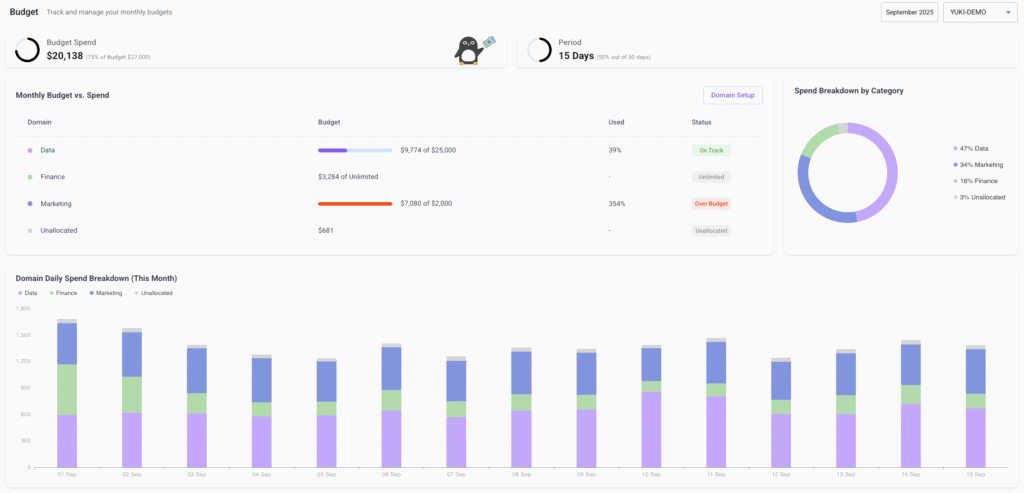
Yuki brings Snowflake cost control back to the front seat: real-time budget tracking, domain-level allocations, and early-warning alerts before spend gets out of hand.
We had traded twenty manual toggles for thirty semi-automatic ones, plus a recurring calendar invite for a weekly “Why Did We Blow the Budget?”.
This evolution created a paradox. The more sophisticated our usage of Snowflake became, the more management overhead the platform demanded from us. We were being “rewarded” for our expertise with more knobs to turn and more variables to monitor. It was a “sophistication trap,” and it was burning out my best engineers by turning them from innovators into infrastructure babysitters.
A Day in the Life of a Snowflake Firefighter
I had one day that revealed the fundamental cycle we were trapped in. A performance fire (latency) leads to a reactive over-provisioning fix. This creates a cost fire, which leads to a under-provisioning fix. This, in turn, creates the perfect conditions for the next performance fire. Each “fix” was actually the cause of the next problem. The system was inherently unstable when managed by a human making reactive, context-free decisions. I built a Lambda that was suppose to handle it, but it failed because it was blind. It could see a queue, but it couldn’t see the context, that this was a critical, long-running job that should never be interrupted. The problem wasn’t a lack of tools, it was the limits of human cognition.
The Epiphany: Why Every Query Deserves Its Own Warehouse
That failed Lambda was my breaking point. It was winter 2022, and after yet another weekend spent patching thresholds and apologizing to the on-call team, I sat at my desk and scribbled a mantra on a sticky note:
Every query deserves its own warehouse.
But, I added a crucial one:
…and no human should have to decide that 500,000 times a day.
This was the moment of clarity that led to Yuki.
Snowflake hands us these incredibly powerful Lego bricks, different sizes, generations, adaptive settings, multi-cluster scaling, and tells us to build our own perfect, cost-effective solution. The burden of Snowflake Cost optimization is intentionally shifted to us. This problem isn’t a bug, it’s a feature of their business model. It’s permanent.
Realizing this, I knew we had to build our own solution. The answer was a slim, lightweight proxy that could sit invisibly between our client applications and Snowflake itself. Its mission was simple: intercept every query, analyze it in milliseconds, and route it to the perfect warehouse for the job, at that exact moment in time.
We designed a Decision Engine to be the brains of the operation. It doesn’t just look at one metric, it looks at everything:
- Planner Estimates: What does Snowflake’s own query planner project for scan bytes, partitions, and join complexity?
- Result-Set Clues: Does the query contain LIMIT 1, COUNT(*), or complex window functions? Each hints at a different optimal size.
- Live Warehouse Metrics: What is the current load, memory pressure, queue, and credit burn rate of every available warehouse?
- Historical Latency: How have queries with a similar “shape” performed in the past?
- Budget Tracking: How much of our cost center’s budget has been consumed in the last 60 minutes?
As the person who would be responsible for this new component, I was paranoid about its reliability. We built it from the ground up with fail-safes. The proxy runs in stateless pods, so a restart doesn’t break user sessions. It’s designed to fail-closed, if the Decision Engine is ever unreachable, the proxy simply passes the query through to your pre-configured warehouse. The worst-case scenario is that you’re right back where you started. And we built an audit mode, allowing teams to run it in the background where it only logs the decisions it would have made, proving its value safely before it ever touches a live query. This architecture was designed by someone who understands the organizational fear of adding a new, critical component to the data path.

Yuki dynamically shifts queries to the optimal warehouse, cutting Snowflake’s compute costs by tens of percent – no manual tuning needed.
Wrapping Up: Complexity Is Invited, Suffering Is Optional
Snowflake is going to keep innovating. There will be Gen 3 warehouses, GPU-powered pools. That’s great. More powerful Lego bricks will unlock incredible new architectures.
But humans shouldn’t be spending their Friday nights resizing warehouses or their Tuesday mornings defending budget overruns. That’s a job for intelligent, context-aware automation. Yuki started as my personal painkiller, a tool to reclaim my team’s time and my own sanity. Today, it routes billions of queries a month for our customers, routinely chopping a third or more off their compute bills without a single code change.
It restores the original promise of the cloud data warehouse. It brings back that feeling of the “good old days,” where my team could focus on building things that create business value, confident that the infrastructure would just work.
If your Snowflake cost graph looks like the Himalayas, or your dashboards still stutter during peak hours, maybe it’s time to stop building bigger, more complicated plumbing. Remember the scribble that started it all: Every query deserves its own warehouse. With the right proxy, it gets one, no guesswork, no spreadsheets, and no 3 a.m. Slack pings.
2026 Update: Snowflake Adaptive Warehouse is live!
When I wrote this post last July, Adaptive Warehouse had just been announced. I was reacting to a keynote and a pitch deck. This week, it finally shipped to public preview — and I can confirm, with no joy whatsoever, that reality is worse than the marketing. Read the full 2026 Snowflake adaptive warehouse update here.
The two knobs are now real and have names: MAX_QUERY_PERFORMANCE_LEVEL (the ceiling – XSMALL through X4LARGE) and QUERY_THROUGHPUT_MULTIPLIER (how many “max-sized” queries can run in parallel, default 2).
Snowflake also swapped the hourly credit budget I complained about for a new billing model they call “query-based” – in theory, you pay per query rather than per warehouse-second. In practice, there are still system-level minimums that don’t collapse cleanly on sparse traffic, and query-level cost visibility isn’t even in ACCOUNT_USAGE yet – it’s planned for GA. So you’re flying blind on which query is costing what, while tuning two interdependent knobs that Snowflake’s own docs describe in three different configuration patterns depending on workload type.
A few other things worth knowing before you convert anything:
- Enterprise Edition minimum. Public preview is in three regions only.
- You can’t convert Snowpark-Optimized or Interactive warehouses to Adaptive. If you run memory-heavy ML on Snowpark – and you should – Adaptive isn’t even an option for that workload.
- X5Large and X6Large are out too.
- Conversion is online but you pay for both compute pools while in-flight queries finish.
None of this changes the core argument I made last July. It reinforces it. Snowflake didn’t eliminate a single decision; they added a fourth warehouse type, two new knobs, and a billing model that rewards a specific workload shape. Yuki now treats Adaptive as a first-class execution target alongside Gen-1, Gen-2, and Snowpark-Optimized – because in 2026, every query still deserves its own warehouse, and now there are just more warehouses to pick from.